Today is Pi Day (March 14, or 3.14). Of course, we celebrated with our traditional Pizza Pi(e)s. But because Google informed me it was also the 101st birthday of Akira Yoshizawa, who is considered the grandfather of origami (see below):
I went searching for origami and circles, and chanced upon this wonderful website, WholeMovement.com. The author, Bradford Hansen-Smith, inspired in part by Buckminster Fuller, has compiled tons of information about all the mathematical and other concepts one can learn by folding circles. It doesn't take fancy equipment--he starts with paper plates and bobby pins--but it can take you deep into mathematical and geometric concepts.
So a great way to observe Pi Day (besides eating pie, pizza or otherwise) is to check out his website.
Showing posts with label Google. Show all posts
Showing posts with label Google. Show all posts
Wednesday, March 14, 2012


Tuesday, March 13, 2012
Win $50,000 in the Google Science Fair
Do you know any teenagers (13-18) working on an awesome science project of their own design? If so, you may want to encourage them to enter it in the Google Science Fair, an international online science competition sponsored by Google in partnership with CERN, LEGO, National Geographic, and Scientific America.
The Google Science Fair follows the same basic rules and procedures as a physical science fair, but students must go the extra step of presenting their work through videos and other digital means (another good skill to be developing). Students from public, private, or home schools around the world can compete in the three age categories of 13-14, 15-16, and 17-18. There will be 15 global finalists who will be flown to a physical competition event at Google headquarters in July. The finalist winners in each age category are awarded a $25,000 scholarship and the opportunity to engage in a high level science research experience, while the Grand Prize winner will get a $50,000 and a National Geographic scientific expedition to the Galapagos. There is also a $50,000 prize for the Science in Action winner, the project that best addresses a social, environmental, or health issue in a way that makes a difference in the lives of a group or community.
For more information or to sign up, visit the Google Science Fair website. However, projects are due by April 1, 2012, so your student scientists will have to submit their work soon.
For an inspirational video Google produced encouraging student science, click below:
And to hear more about the rules of the competition, watch the following video:
The Google Science Fair follows the same basic rules and procedures as a physical science fair, but students must go the extra step of presenting their work through videos and other digital means (another good skill to be developing). Students from public, private, or home schools around the world can compete in the three age categories of 13-14, 15-16, and 17-18. There will be 15 global finalists who will be flown to a physical competition event at Google headquarters in July. The finalist winners in each age category are awarded a $25,000 scholarship and the opportunity to engage in a high level science research experience, while the Grand Prize winner will get a $50,000 and a National Geographic scientific expedition to the Galapagos. There is also a $50,000 prize for the Science in Action winner, the project that best addresses a social, environmental, or health issue in a way that makes a difference in the lives of a group or community.
For more information or to sign up, visit the Google Science Fair website. However, projects are due by April 1, 2012, so your student scientists will have to submit their work soon.
For an inspirational video Google produced encouraging student science, click below:
And to hear more about the rules of the competition, watch the following video:
Tuesday, February 7, 2012
Curriculum Resource: The Life of Charles Dickens
Happy 200th Birthday to Charles Dickens! Once again, it was Google who brought this to my attention, as it made him the subject of today's Google Doodle:
If you are looking for a short video on Dicken's life, here is a lovely little cartoon version from the BBC:
Enjoy!
If you are looking for a short video on Dicken's life, here is a lovely little cartoon version from the BBC:
Enjoy!
Thursday, January 12, 2012
The Best Google Doodle of 2011
Yesterday's Google Doodle reminded me...how could I not have written about the Best Google Doodle of 2011 as part of my New Yearl's posts? There were so many wonderful Doodles that is is hard to choose. Some were really beautiful, some were educational (like the Nicolas Steno one yesterday), and some were so inventive, like the Jim Henson one where you could manipulate the Muppet puppets or the Freddie Mercury one? (was that it?) where you could actually play notes?
But one was the nearest and dearest to the hearts in our household, and that was the interactive submarine view for Jules Verne's birthday:

Visit my original post for a video of all the things you could find in this interactive display.
But if you aren't clear about the outstanding Google Doodle for the past year, you can watch this video for some reminders of all the great displays Google gave us this year:
So which one was your favorite Doodle for 2011? Add it to the comments below.
But one was the nearest and dearest to the hearts in our household, and that was the interactive submarine view for Jules Verne's birthday:

Visit my original post for a video of all the things you could find in this interactive display.
But if you aren't clear about the outstanding Google Doodle for the past year, you can watch this video for some reminders of all the great displays Google gave us this year:
So which one was your favorite Doodle for 2011? Add it to the comments below.
Wednesday, January 11, 2012
Who is Nicolas Steno?
I know, it sounds like that movie, The Usual Suspects, where they ask "Who is Keyser Soze?" But that is the question I asked when I saw the beautiful Google Doodle this morning.
There have been lots lately, but I thought this one was particularly eye-catching. Plus, when I check out most of the Google Doodles, I know something about the subject. But Nicolas Steno? Never heard of him.
Of course, that led to me reading hyperlinks to information about the man and his work, which was all interesting and ended up diverting me for far too long. But how great it is that Google throughs these little diversions at us. I have my issues with Google as a company, but I love the whimsy that is illustrated in the Google Doodle program.
If you happen not to know about Nicolas Steno either, you can watcht the Google Doodle video below:
There have been lots lately, but I thought this one was particularly eye-catching. Plus, when I check out most of the Google Doodles, I know something about the subject. But Nicolas Steno? Never heard of him.
Of course, that led to me reading hyperlinks to information about the man and his work, which was all interesting and ended up diverting me for far too long. But how great it is that Google throughs these little diversions at us. I have my issues with Google as a company, but I love the whimsy that is illustrated in the Google Doodle program.
If you happen not to know about Nicolas Steno either, you can watcht the Google Doodle video below:
Friday, December 23, 2011
Christmas 2011 Blog: Google Holiday Doodle Arrives
Google has released its annual Christmas-time doodle. You begin by clicking on colors beneath each Google letter, which transforms them to an image in lights (maybe they also went to Zoolights this year!). Each color box also has a note, which you might notice....indicate a favorite song of this time of the year. Eventually all the images appear and the song plays in full.
You can go to the Google home page to see it yourself, or watch the video below:
Enjoy!
You can go to the Google home page to see it yourself, or watch the video below:
Enjoy!
Monday, December 19, 2011
Christmas 2011 Blog: Google "Ornament" (Easter Egg) Makes It Snow
The elves at Google have been up to their usual holiday merriment. They have programmed a so-called "Easter Egg" for your frosty amusement.
If you go to the Google home page and type in the words "let it snow," first you will see a variety of YouTube videos of the song of that title by different performers. However, you'll soon notice something else--digital snowflakes are falling from the top of your screen. Eventually, the screen will frost up, and by dragging your mouse while holding the button down, you can clear areas of the screen, just like you do with your finger on a icy window. Once you are tired of that, you can hit the Defrost button to clear the screen completely.
It's a cute little thing to try, although apparently it doesn't work on all browsers, such as Internet Explorer (I'm using Safari myself).
Below is a video showing how it works.
Enjoy!
If you go to the Google home page and type in the words "let it snow," first you will see a variety of YouTube videos of the song of that title by different performers. However, you'll soon notice something else--digital snowflakes are falling from the top of your screen. Eventually, the screen will frost up, and by dragging your mouse while holding the button down, you can clear areas of the screen, just like you do with your finger on a icy window. Once you are tired of that, you can hit the Defrost button to clear the screen completely.
It's a cute little thing to try, although apparently it doesn't work on all browsers, such as Internet Explorer (I'm using Safari myself).
Below is a video showing how it works.
Enjoy!
Tuesday, November 22, 2011
Google's Thanksgiving Doodle Makes You a Turkey Designer
Google's Thanksgiving Doodle came early this year, and it's so much fun, I wanted to let people know about it. At least today (Tuesday, November 22), if you go to the Google Home Page, you will see a cartoon turkey. But if you click on the turkey's head, feet, and tail feathers, you can change them to your preference. If you click on the wing, it will rapidly cycle through all the choices simultaneously, which gives you some ideas about your options.
Once you have created your custom turkey, you can either share it through Google+ or through a weblink. So, for example, to see the turkey I designed, visit: http://g.co/doodle/d7bz39 .
If you create your own turkey, please share it in the comments below--I would love to see people's creative turkeys! It's a fun and easy way to get into the holiday spirit.
Once you have created your custom turkey, you can either share it through Google+ or through a weblink. So, for example, to see the turkey I designed, visit: http://g.co/doodle/d7bz39 .
If you create your own turkey, please share it in the comments below--I would love to see people's creative turkeys! It's a fun and easy way to get into the holiday spirit.
Monday, October 31, 2011
Happy Halloween
We are back from tromping through the rain and mist with some friends in what is the closest that most of our children will get to participating in a true harvest festival--the "trick or treat" tradition of Halloween. My son's goodie bag is sufficiently loaded with loot that it will probably take him a week or more to eat it all or to decide to dispose of it.
So the weather wasn't the most cooperative this year, since it was rainy and cold tonight. Something that did warm my heart, though, was the Doodle that Google displayed on its home page today.
Google had a time-lapse video of some staff carving GIGANTIC (I think they were half-ton) pumpkins into what eventually became a Google logo. But in between carving, various other staff came and hung out, sometimes in costume. You can watch the video below:
It is a cute, creative, and original tribute to this autumnal holiday, and one that you can enjoy without any calories, which is rare this time of year. It also adds to the impression that it must be a real kick to work at Google (for more on that, see this post).
For even more fun, you can watch this video in which the pumpkin artists explain their process and what it is like to carve a half-ton pumpkin:
Happy Halloween 2011 to all!
So the weather wasn't the most cooperative this year, since it was rainy and cold tonight. Something that did warm my heart, though, was the Doodle that Google displayed on its home page today.
Google had a time-lapse video of some staff carving GIGANTIC (I think they were half-ton) pumpkins into what eventually became a Google logo. But in between carving, various other staff came and hung out, sometimes in costume. You can watch the video below:
It is a cute, creative, and original tribute to this autumnal holiday, and one that you can enjoy without any calories, which is rare this time of year. It also adds to the impression that it must be a real kick to work at Google (for more on that, see this post).
For even more fun, you can watch this video in which the pumpkin artists explain their process and what it is like to carve a half-ton pumpkin:
Happy Halloween 2011 to all!
Saturday, September 24, 2011
Google Honors Jim Henson with Digital Puppet Doodle
With my recent gushing about the power of origami finger puppets, I just couldn't let today's Google Doodle go by without comment. Today would have been the 75th birthday of Jim Henson, the man behind Sesame Street and, really, the inclusion of puppetry in modern media. So in honor of that event, Google worked with Henson's legacy, the Jim Henson company, to create a set of five interactive digital puppets for today's Google Doodle. These puppets follow your mouse arrow with their eyes and/or head, and open their mouths when you click a mouse button. There is no sound, so you can play with the puppets and make they say whatever you like--let's hope they are as wise as Origami Yoda. Just kidding, of course--no one is as wise as Origami Yoda!
Anyway, check them out on the Google home page, or if you miss them, here is a video of them:
Anyway, check them out on the Google home page, or if you miss them, here is a video of them:
Monday, August 22, 2011
Behold: A Qualitative Creative Commons Image Search Engine
A wonderful new tool I have discovered recently is Behold, which is a search engine for images.

Of course, you can search images with a number of different search engines. The things that makes Behold different are that:
1. Behold searches among Flikr photos, particularly those that can be used freely (for non-commerical purposes) under a Creative Commons license (that is, people who are willing to share their photos for non-money-making purposes without the usual copyright restrictions).
2. Behold somehow filters the photos, and searches among only the million plus photos it considers to be "high quality."
3. Behold has a way of combining image search tags, so that after you bring up "buildings," you can search for "towers" or "skylines" or other subsets of that tag.
I don't know exactly how it does what it does, but I will say that every search I've done with Behold has come up with professionally-quality photographs, not just any old thing that anybody has taken with a cheap disposal camera.
More importantly, Behold is a source we can use with our students to help them appreciate intellectual property rights. All too often, students feels like they can just take any image they want from the internet and use it in their own work. So it is great to direct them to a search engine like Behold where they can restrict their searches to photos where people have agreed to share their creations (under the perimeters of the Creative Commons license).

Of course, you can search images with a number of different search engines. The things that makes Behold different are that:
1. Behold searches among Flikr photos, particularly those that can be used freely (for non-commerical purposes) under a Creative Commons license (that is, people who are willing to share their photos for non-money-making purposes without the usual copyright restrictions).
2. Behold somehow filters the photos, and searches among only the million plus photos it considers to be "high quality."
3. Behold has a way of combining image search tags, so that after you bring up "buildings," you can search for "towers" or "skylines" or other subsets of that tag.
I don't know exactly how it does what it does, but I will say that every search I've done with Behold has come up with professionally-quality photographs, not just any old thing that anybody has taken with a cheap disposal camera.
More importantly, Behold is a source we can use with our students to help them appreciate intellectual property rights. All too often, students feels like they can just take any image they want from the internet and use it in their own work. So it is great to direct them to a search engine like Behold where they can restrict their searches to photos where people have agreed to share their creations (under the perimeters of the Creative Commons license).
Friday, July 22, 2011
Celebrating Calder
Today is the 113th birthday of the great American artist Alexander Calder, most famous for inventing the moving sculptures known as mobiles. His colorful and fun work decorate many of the world's most famous buildings, including the entrance to the East Wing of the National Gallery of Art in DC and the Twin Tower building (prior to their destruction on 9/11).
This occasion is being celebrated by one of the highest honors in the early 21st century--being recognized through a Google Doodle (which replaces the usual Google trademark name for a day at the top of the search engine). As befits the revolutionary and whimsical nature of his work, Calder's Doodle is not just an ordinary Doodle. This Doodle is interactive; you can move the different components of the mobile shown by clicking on it with your mouse, or, if you have the right kind of laptop, by tilting the screen one way or another. You can see the interaction in the movie below:
This Doodle is particularly appropriate to our household because next week, my son is going to a week-long art camp entitled "Chihuly, Calder, Christo." Here is the description:
So I may not be able to do the camp, but I do foresee some more Calder in my future. In 2012, those of us in the Triangle NC region will be fortunate enough to have a major new Calder exhibit at our fingertips. The Nasher Museum of Art at Duke University in Durham will be presenting "Alexander Calder and Contemporary Art: Form, Balance, Joy," which will include 34 pieces by Calder, along with works by contemporary artists inspired by him. You can read more about the exhibit here, but I KNOW we'll be having a homeschool field trip there once the exhibit opens.
We have to wait until February 2012 for the start of that exhibit. But check in next week, and we will share some of my son's Calder-inspired sculptures.
This occasion is being celebrated by one of the highest honors in the early 21st century--being recognized through a Google Doodle (which replaces the usual Google trademark name for a day at the top of the search engine). As befits the revolutionary and whimsical nature of his work, Calder's Doodle is not just an ordinary Doodle. This Doodle is interactive; you can move the different components of the mobile shown by clicking on it with your mouse, or, if you have the right kind of laptop, by tilting the screen one way or another. You can see the interaction in the movie below:
This Doodle is particularly appropriate to our household because next week, my son is going to a week-long art camp entitled "Chihuly, Calder, Christo." Here is the description:
You will make startling sculptures fashioned after these cutting edge artists. With the use of plastic, wire, and metals, you will create moving abstract art to enjoy for years to come.Doesn't that sound great? Honestly, I wish I could take half the classes and camps and such that my son does, because there are just so many really fun and interesting educational opportunities in this community.
So I may not be able to do the camp, but I do foresee some more Calder in my future. In 2012, those of us in the Triangle NC region will be fortunate enough to have a major new Calder exhibit at our fingertips. The Nasher Museum of Art at Duke University in Durham will be presenting "Alexander Calder and Contemporary Art: Form, Balance, Joy," which will include 34 pieces by Calder, along with works by contemporary artists inspired by him. You can read more about the exhibit here, but I KNOW we'll be having a homeschool field trip there once the exhibit opens.
We have to wait until February 2012 for the start of that exhibit. But check in next week, and we will share some of my son's Calder-inspired sculptures.
Thursday, July 21, 2011
Sweet Search: The Search Engine for Students
Following on the heels of my recent post about social media that included networking sites designed specifically for the middle school and younger set, I thought I should also spread the word about a search engine designed for students. Sweet Search is a search engine that has been created by educational researchers specifically for use by students. Sweet Search produces results from only the 35,000 websites that have been personally "vetted" or visited and approved by actual humans with educational or research credentials, not search bots. That means that the results of the students information request will be quantitatively smaller (which is generally good for students learning to access and evaluate information they find over the Internet) but qualitatively better. Only links to sites with respected and appropriate information will be shown--sites like PBS, the Library of Congress, schools and universities, the Smithsonian and other museums, and the like.
For more details on Sweet Search, including a comparison of a typical search on Sweet Search with some other mainstream search engines, see this blog post on Why Sweet Search Is the Best Search Engine for Students.
Sweet Search is designed for middle schoolers and above. They have another site, SweetSearch4Me, that is geared towards elementary students.
For more details on Sweet Search, including a comparison of a typical search on Sweet Search with some other mainstream search engines, see this blog post on Why Sweet Search Is the Best Search Engine for Students.
Sweet Search is designed for middle schoolers and above. They have another site, SweetSearch4Me, that is geared towards elementary students.
Wednesday, July 20, 2011
Lesson Plan: Mendel's Experiments in Genetics
Happy Mendel's Birthday to all! As Google let us know, it is the 189th birthday of Gregor Mendel, the Austrian scientist who first recorded the patterns of reproduction, famously breeding peas to see what traits were passed onto the next generation, and thus earned the title of Father of Genetics.

Like I've said before, we like to celebrate everything around here, so we had a Gregor Mendel birthday party today. We invited some friends over and together did an activity based on Mendel's cross-breeding peas experiment. But since we didn't have the time for new plants to grow, plus peas aren't really that exciting for middle school-aged students, we did a simulated cross-breeding of a much more interesting life form suggested by our recent excursion to see the last Harry Potter movie--we did our simulated gene pool analysis based on breeding dragons! We used a wonderful lesson plan developed at Vanderbilt and added onto by former middle school teacher Nancy Clark called "Inheritance Patterns in Dragons," which you can download from this page. (But if you aren't into dragons, but are into Harry Potter, there is another site where you can map the genetic path through which Muggles can produce witches and wizards and magical folk can have Squibbs from the National Institute of Health.)
After a general explanation of DNA and genetics, each student chose a set of seven "genes" with different dominant or recessive traits from the same male and female parents.

However, a worksheet helped them figure out what traits would be expressed in each specific offspring (fire breathing vs. no fire, number of toes or spines, color of body, wings, and tale, etc.). Then each student drew a picture of a dragon with the genetic trails of that pairing.


So, for example, all the dragons (different in style though they might be) had blue bodies--obviously a dominant trait. Three of the four had red wings and red tails; however, one had yellow wings and a yellow tail. This demonstrates the fact that the same parents can produce a smaller number (statistically) of offspring with recessive trails, even if the parents themselves don't show those traits.
Anyway, the students really enjoyed it, and seemed to be clear about the basics of genetic inheritance after doing this exercise.
Plus, because it was, after all, a birthday party, I made a dish of Dragon Dip:

This is basically a healthier and vegan version of nachos, with whole wheat tortillas as the skeleton, tomato salsa as the blood, refried bean dip as the muscle, and, in honor of Mendel, peas as the dragon skin (except for the wings, where the skin is made of corn. It is finished off with a grape tomato for its eye and dried jalapeno peppers as the fire breathing part, heated in the oven until hot, and them consumed with dragon skills (tortilla chips).
There are also some great online resources to use to explore this topic. BioLogica has two web labs on genetics: an online dragon genetics simulation, and animations of topics like meiosis along with a pea breeding experiment (like Mendel's) that is based on the fairy tale of the Princess and the Pea. The Pea Soup website tells Mendel's story, as well as having an interactive simplified simulation of the pea experiment.
This is a fun topic to explore with middle schoolers, especially if you can include some of these more imaginative resources.....and everything goes better with some dragon-based food!

Like I've said before, we like to celebrate everything around here, so we had a Gregor Mendel birthday party today. We invited some friends over and together did an activity based on Mendel's cross-breeding peas experiment. But since we didn't have the time for new plants to grow, plus peas aren't really that exciting for middle school-aged students, we did a simulated cross-breeding of a much more interesting life form suggested by our recent excursion to see the last Harry Potter movie--we did our simulated gene pool analysis based on breeding dragons! We used a wonderful lesson plan developed at Vanderbilt and added onto by former middle school teacher Nancy Clark called "Inheritance Patterns in Dragons," which you can download from this page. (But if you aren't into dragons, but are into Harry Potter, there is another site where you can map the genetic path through which Muggles can produce witches and wizards and magical folk can have Squibbs from the National Institute of Health.)
After a general explanation of DNA and genetics, each student chose a set of seven "genes" with different dominant or recessive traits from the same male and female parents.

However, a worksheet helped them figure out what traits would be expressed in each specific offspring (fire breathing vs. no fire, number of toes or spines, color of body, wings, and tale, etc.). Then each student drew a picture of a dragon with the genetic trails of that pairing.


So, for example, all the dragons (different in style though they might be) had blue bodies--obviously a dominant trait. Three of the four had red wings and red tails; however, one had yellow wings and a yellow tail. This demonstrates the fact that the same parents can produce a smaller number (statistically) of offspring with recessive trails, even if the parents themselves don't show those traits.
Anyway, the students really enjoyed it, and seemed to be clear about the basics of genetic inheritance after doing this exercise.
Plus, because it was, after all, a birthday party, I made a dish of Dragon Dip:
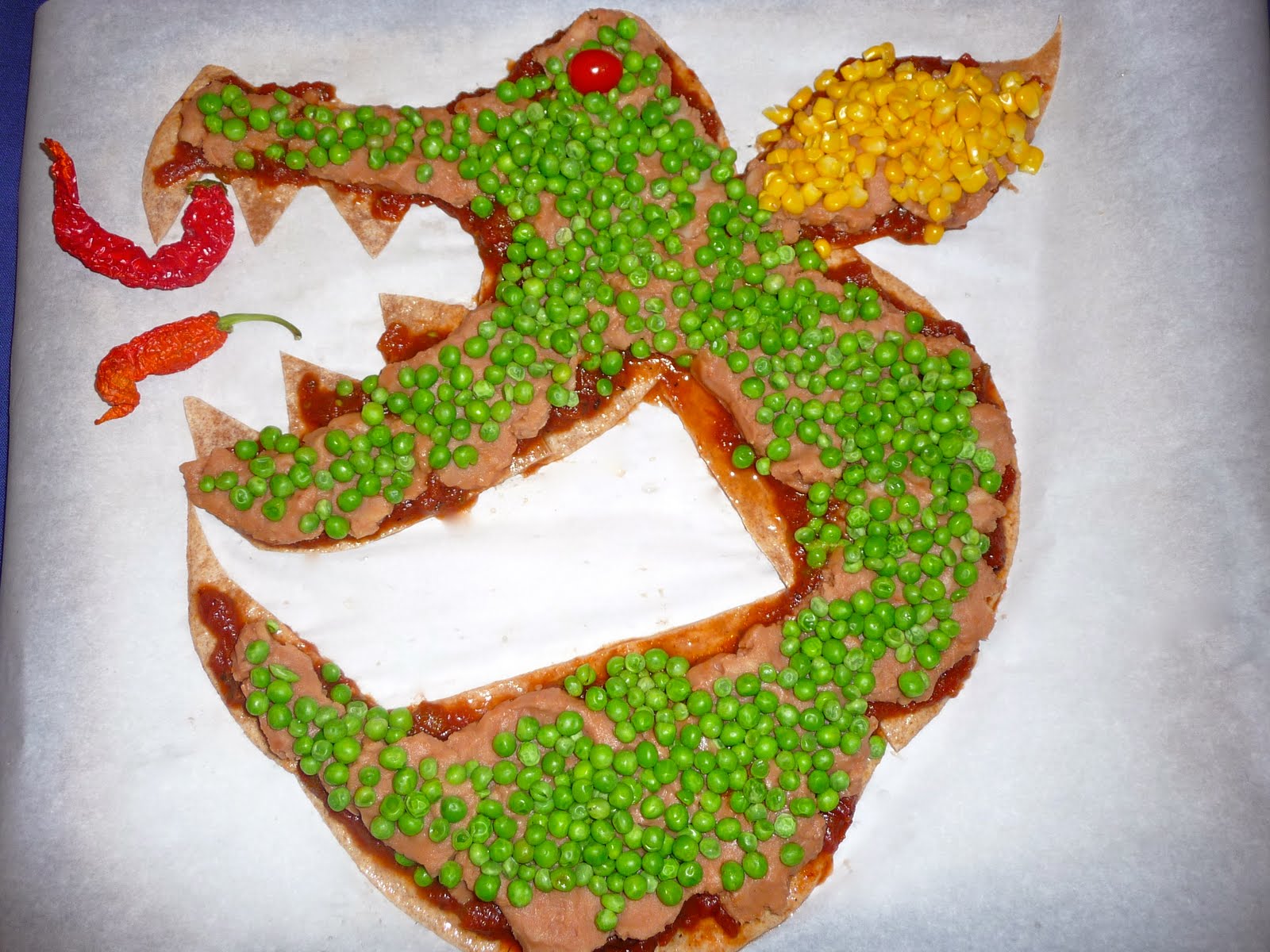
This is basically a healthier and vegan version of nachos, with whole wheat tortillas as the skeleton, tomato salsa as the blood, refried bean dip as the muscle, and, in honor of Mendel, peas as the dragon skin (except for the wings, where the skin is made of corn. It is finished off with a grape tomato for its eye and dried jalapeno peppers as the fire breathing part, heated in the oven until hot, and them consumed with dragon skills (tortilla chips).
There are also some great online resources to use to explore this topic. BioLogica has two web labs on genetics: an online dragon genetics simulation, and animations of topics like meiosis along with a pea breeding experiment (like Mendel's) that is based on the fairy tale of the Princess and the Pea. The Pea Soup website tells Mendel's story, as well as having an interactive simplified simulation of the pea experiment.
This is a fun topic to explore with middle schoolers, especially if you can include some of these more imaginative resources.....and everything goes better with some dragon-based food!
Sunday, June 26, 2011
Curriculum Resource: A Google A Day
I've written on this blog before about the importance of knowing how to use Google to find the information we need on the Internet. I've just recently stumbled upon another way of learning how to use Google effectively; take advantage of the search engine's daily puzzle, A Google a Day.
What this website does is pose, basically, a trivia question. However, it is a trivia question that usually has several different bits of information that you need to combine in order to answer the question. Here is an example:
Once you answer the question (or give up), the website suggests the items on which to search, or the search techniques to use, in order to get the right answer. So it can be a stand-alone teaching device for searching techniques.
I don't use this every day, but every so often, I will send one to my son to help develop his searching skills. So, for example, since he is a cephalopod lover, I gave him this one:
What this website does is pose, basically, a trivia question. However, it is a trivia question that usually has several different bits of information that you need to combine in order to answer the question. Here is an example:
After everyday exposure to this element with 82 protons and 126 neutrons, the Huns were the least of the Roman Empire’s problems. This cumulative poison was used as a preservative in what drink?As this demonstrates, the questions makes students isolate what information they do have and figure out how to use that to get the information the question is seeking. So this is a great resource because it is teaching the thinking component of the search process, not just giving technical instructions. However, sometimes they do ask questions that require some advanced searching techniques, such as the ones I mentioned in this post.
Once you answer the question (or give up), the website suggests the items on which to search, or the search techniques to use, in order to get the right answer. So it can be a stand-alone teaching device for searching techniques.
I don't use this every day, but every so often, I will send one to my son to help develop his searching skills. So, for example, since he is a cephalopod lover, I gave him this one:
All cephalopod mollusks with three hearts are carnivorous, but only one type living in temperate waters is deadly to humans. What does this deadly cephalopod normally feed on?...which actually turned out not to be a great problem for him, since he already knew the only deadly cephalopod living in temperate waters, and thus didn't have to do a two-level search. But you get the idea.
Friday, May 20, 2011
Doodle 4 Google Contest Winner
Several months ago, I had a post about the contest that Google holds to have school-aged children design a Google Doodle. The winner not only gets a $15,000 college scholarship, laptop, and digital drawing tablet, but he or she gets the winning design on the Google home page for a day (meaning it will be seen by millions of people).
Today is the day that they are displaying the winning design. Here it is:
The winning artist is Matteo Lopez from Monte Verde Elementary School in South San Francisco, CA. Matteo is only 7 years old--can you believe it? It's kind of scary that a second grade student can already draw better already that I ever have been able to do.
Matteo is not the only one, though--check out this set of 2011 Regional Finalists, or this other set of 2011 State Finalists. They are an incredibly talented and creative bunch of artists!
Matteo's entry, entitled Space Life, is his answer to the Google contest prompt of "What I would like to do someday...." Matteo's response is: "is become an astronaut and explore space life. I want to wear a space suit, fly in space, walk on the moon, and make friends with aliens in other planets." That is a beautiful sentiment to go along with a beautiful picture.
There was a middle school student who was one of three National Finalists: Justas Varpucanskis, a seventh grader from Mokena Junior High School in Mokena, Illinois. Justas' picture, called The Majestic Sea, is a beautifully painted sea scene. He writes about his dream that:
Congratulations to Matteo and Justin, the other two National Finalists, and all the other State and Regional winners. Their artwork and their dreams are both inspiring.
Today is the day that they are displaying the winning design. Here it is:
 |
| Doodle 4 Google 2011 Winning Design by Matteo Lopez |
The winning artist is Matteo Lopez from Monte Verde Elementary School in South San Francisco, CA. Matteo is only 7 years old--can you believe it? It's kind of scary that a second grade student can already draw better already that I ever have been able to do.
Matteo is not the only one, though--check out this set of 2011 Regional Finalists, or this other set of 2011 State Finalists. They are an incredibly talented and creative bunch of artists!
Matteo's entry, entitled Space Life, is his answer to the Google contest prompt of "What I would like to do someday...." Matteo's response is: "is become an astronaut and explore space life. I want to wear a space suit, fly in space, walk on the moon, and make friends with aliens in other planets." That is a beautiful sentiment to go along with a beautiful picture.
There was a middle school student who was one of three National Finalists: Justas Varpucanskis, a seventh grader from Mokena Junior High School in Mokena, Illinois. Justas' picture, called The Majestic Sea, is a beautifully painted sea scene. He writes about his dream that:
"What I'd like to do someday..." is to take part in the conservation of our underwater universe. There is no doubt the last decades were an environmental catastrophe. The underwater world is a have for many sea creatures, thus being crucial to our existence. We need to preserve our underwater ecosystem.Here is his fabulous piece of art:
 |
| 2011 Doodle 4 Google Middle School National Finalist, Justin Varpucanskis |
Congratulations to Matteo and Justin, the other two National Finalists, and all the other State and Regional winners. Their artwork and their dreams are both inspiring.
Saturday, May 14, 2011
How to Search On Google--Advanced Tips
I don't know about you, but I would be lost without Google. I truly can't imagine what it was like for parents to homeschool before Google and the World Wide Web. And my son has grown up with an idea of Google as an omnipotent information source. I think he was only five when, after asking me one of those questions that has been pondered for ages (like "which came first, the chicken or the egg?"), he responded to my answer that I didn't know with a sigh and a disgusted face and said, "Mom, just Google it."
That said, I've only recently realized how much I had been missing about how to use this powerful tool. Here are a few of the features that I've only learned about lately:
That said, I've only recently realized how much I had been missing about how to use this powerful tool. Here are a few of the features that I've only learned about lately:
- Did you know you could use Google as a calculator? It serves as an advanced math calculator, in fact, since it can give you the answer to math equations with symbols that I've long ago forgotten what they stand for.
- Did you know that they have a special search engine, called Google Scholar, that is geared to searching through scholarly literature? This search engine attempts to rank the responses to your quest the way an academic researcher would--that is, looking not only at the text of the article, but weighing factors such as the author, where it was published, and how many times it had been cited in other scholarly journals, before ordering the responses to your search request.
- Did you know that if you are looking for something within a particular website, but it doesn't have its own internal search engine, you can make Google do a site-specific search?
- Did you know you could use Google to give you conversions, like changing dollars into English pounds, or degrees Farenheit into degree Centigrade, or other metric conversions of distance and weight?
- Did you know you could use Google as a dictionary?
Well, maybe you did, but I didn't. But Google Education is here to the rescue! They have recently developed a series of posters for teachers to post in the classroom to educate students about search engine terminology, symbols, and best practices. You can download them here, and even if you don't print them out as posters, you can keep the documents on your computer when you need a quick reminder about how to search for, say, Martin Luther King Jr. quotes ONLY during the Kennedy Administration, or gathering information about twilight without venturing into vampire territory.
Friday, April 22, 2011
Google's Earth Day 2011 Interactive Doodle
We love tracking the Google Doodle, and today's one in honor of Earth Day is one of our favorites! It is interactive, so that you can actually make nine different animals move when you move your mouse over them.
First, try to find them yourself at Google (if you are reading this post on April 22):
Or, if you are too late or missed some, you can watch this video:
Finally, you can see the evolution of the Google Earth Day doodle over the past decade at this link.
First, try to find them yourself at Google (if you are reading this post on April 22):
Or, if you are too late or missed some, you can watch this video:
Finally, you can see the evolution of the Google Earth Day doodle over the past decade at this link.
Tuesday, February 8, 2011
Happy Birthday Jules Verne!
Today Google has what I think may be my favorite ever of all of its famous Doodles! It is an INTERACTIVE undersea portal. You can move the lever up and down and see marine creatures that live in the different layers of the ocean. They even have my son's favorite cephalopod, the nautilus!

When I investigated why Google had done this, I found out that today is the 183rd birthday of the original science fiction writer, Jules Verne. Born in France on February 8, 1828, Verne was famous for his imaginative novels involving technology ahead of its time. And in our house, we are glad to see that Google chose our favorite Verne book, 20,000 Leagues Under the Sea, as its inspiration for its Verne Doodle. Kudos to Google for its imaginative nod to a wonderful writer! Check out the real thing on the Google home page.
Quiz question for the day: Does anyone remember the name of the underwater vessel in Verne's 1870 deep sea adventure?
Also, a reminder that Google is running a student Doodle design contest, but you must register by March 2, which will be here before you know it. See the details in my previous blog post.
And as long as I am doing reminders, remember that I am running a book giveaway for Valentine's Day. If you haven't already entered, you can do so in the comments section of this blog post.
UPDATE: Ooooh, we just found the Treasure Chest! Has anyone else found it? Or any other neat
surprises we might have missed?
FEBRUARY 9 UPDATE: The Doodle has left the home page, but here is a YouTube video that lets you see it, in case you missed it:

When I investigated why Google had done this, I found out that today is the 183rd birthday of the original science fiction writer, Jules Verne. Born in France on February 8, 1828, Verne was famous for his imaginative novels involving technology ahead of its time. And in our house, we are glad to see that Google chose our favorite Verne book, 20,000 Leagues Under the Sea, as its inspiration for its Verne Doodle. Kudos to Google for its imaginative nod to a wonderful writer! Check out the real thing on the Google home page.
Quiz question for the day: Does anyone remember the name of the underwater vessel in Verne's 1870 deep sea adventure?
Also, a reminder that Google is running a student Doodle design contest, but you must register by March 2, which will be here before you know it. See the details in my previous blog post.
And as long as I am doing reminders, remember that I am running a book giveaway for Valentine's Day. If you haven't already entered, you can do so in the comments section of this blog post.
UPDATE: Ooooh, we just found the Treasure Chest! Has anyone else found it? Or any other neat
surprises we might have missed?
FEBRUARY 9 UPDATE: The Doodle has left the home page, but here is a YouTube video that lets you see it, in case you missed it:
Wednesday, January 26, 2011
Art Competition: Doodle 4 Google
Google is running an art competition that will result in some K-12 student having his or her design as the logo for the Google home page for one entire day! Entitled "Doodle 4 Google" ("Doodle" being the name Google gives for the specialized adaptations of its corporate logo that are displayed for special days on its home page), a panel of celebrity judges will select up to two designs from each of four age groups from each state (with Washington DC students competing with the Maryland students). The four age groups are Grades K-3, 4-6, 7-9, and 10-12, so middle schoolers are definitely invited to participate. Also, the contest rules specifically state that homeschooled students are eligible to compete. The design should illustrate the theme, "What I'd like to do someday...."
Besides having her/his work displayed on the Google home page for a day, the National Winner will receive a $15,000 college scholarship, a laptop and digital drawing tablet, and a tee shirt printed with the winning design. The three National Finalists (one of whom came from North Carolina last year) each get a $5,000 college scholarship, a digital drawing tablet, and a tee shirt of their design. There will be 40 Regional Finalists who will all be sent to New York to participate in an event to honor their artwork.
To enter, students must register by March 2, 2011, and have their artwork postmarked by March 16, 2011. There will be an online vote by the public on May 4-13, so even if you don't enter, you can help select the ultimate winner.
For complete details, see the contest web page here.
As I've stated in earlier contest announcements, let us know if any of our reader families enters, especially if you end up as a finalist. We would love to see, and maybe even get to vote for, your artwork!
Besides having her/his work displayed on the Google home page for a day, the National Winner will receive a $15,000 college scholarship, a laptop and digital drawing tablet, and a tee shirt printed with the winning design. The three National Finalists (one of whom came from North Carolina last year) each get a $5,000 college scholarship, a digital drawing tablet, and a tee shirt of their design. There will be 40 Regional Finalists who will all be sent to New York to participate in an event to honor their artwork.
To enter, students must register by March 2, 2011, and have their artwork postmarked by March 16, 2011. There will be an online vote by the public on May 4-13, so even if you don't enter, you can help select the ultimate winner.
For complete details, see the contest web page here.
As I've stated in earlier contest announcements, let us know if any of our reader families enters, especially if you end up as a finalist. We would love to see, and maybe even get to vote for, your artwork!
Subscribe to:
Posts (Atom)